PR agencies and teams need a podcast booking tool that helps them find highly relevant podcasts that suit their clients.
But they also want tools that facilitate podcast search and research, let them reach out to podcast hosts, keep track of their outreach pipeline and collaborate with team members all on one platform. Those vital features can save busy teams hours of time and effort.
So, what should PR teams look for when choosing a podcast booking tool, and why do so many turn to Rephonic?
Let's find out.
Table of Contents
What is a podcast booking tool?
A podcast booking tool is software that helps someone book guest appearances on podcasts.
The best tools handle the end-to-end workflow, including:
- finding podcasts
- qualifying podcasts
- organize campaigns
- sending pitches
- managing replies and follow-ups
All that on one platform!
What features should you expect to see?
Large database
Some databases only have tens of thousands of podcasts. This is missing out on a lot of opportunities. Of course, on databases with millions of shows, only a fraction of those will be relevant and worth pitching. But having a large database means you’re not missing any opportunities.
Search tool & filters
The best tools let you search by topic, title, episode and publisher. Searching by name can quickly find a specific podcast or host. Entering a publisher should locate all the shows associated with that person or entity.
Topic and episode searches are broader and the results can include podcasts that don't suit your clients at all. The most effective guest booking tool lets you filter your search to list the most likely podcasts.
Rich data
PR professionals don’t want to waste time sending out generic pitch emails to multiple podcasts. First, because those podcasts may not have the audience they want to attract. Second, because podcast hosts can spot generic emails a mile away and delete them immediately.
That means professionals should conduct highly targeted outreach. They need rich data about audience demographics, listener numbers and engagement, social media and much more. Tools with strong research capabilities are much more likely to give teams the data they need to make informed decisions.
Up-to-date contacts
Every moment spent in searching for contact details is time professionals could be spending on other things, so they want to get contact details quickly and without fuss. So, check that the guest booking tool verifies their contacts. Getting the right contacts first time is the most effective way to save time.

Team collaboration features
Can teams collaborate easily within the booking platform Does it include features where team members can:
- Pin notes
- See search history and target lists
- Read emails
- Set up alerts
- View and share campaigns
Again, busy teams can save time and effort if everyone understands what's happening with each campaign.
Pitching within the platform
When multiple team members pitch from their own email accounts, replies get scattered.
Look for a podcast booking service that centralizes the process with team members sending emails straight from the platform, especially if you need to pitch podcasts for multiple clients.
Check if the platform has a pitch editor with customizable email templates to guide you in creating authentic, effective pitches to podcast hosts.
Campaign management
PR teams often use traditional search engines when they first look for podcasts. They often spend hours searching multiple platforms and transferring their findings into spreadsheets. Each team member then sends outreach emails from their work email addresses. That means manually adjusting the spreadsheet every time something changes—a step that's easily missed.
Podcast outreach involves multiple steps, so when tools include team collaboration features and pipeline managers it means everyone in the team can see what's happening—including which podcasts are on the list, their pipeline status and the email chain, with the initial pitch, follow ups and replies.
Use Rephonic to improve your podcast booking workflow
Rephonic is a comprehensive podcast database with tools and features designed to make the entire booking workflow more efficient. PR teams use it to find, qualify and book podcast guest appearances for clients.
Working on Rephonic speeds up PR podcast outreach. It provides all the data you need to keep the emphasis on finding and booking quality podcasts that are highly relevant for your clients.
Here's how it works.
1. Find relevant podcasts
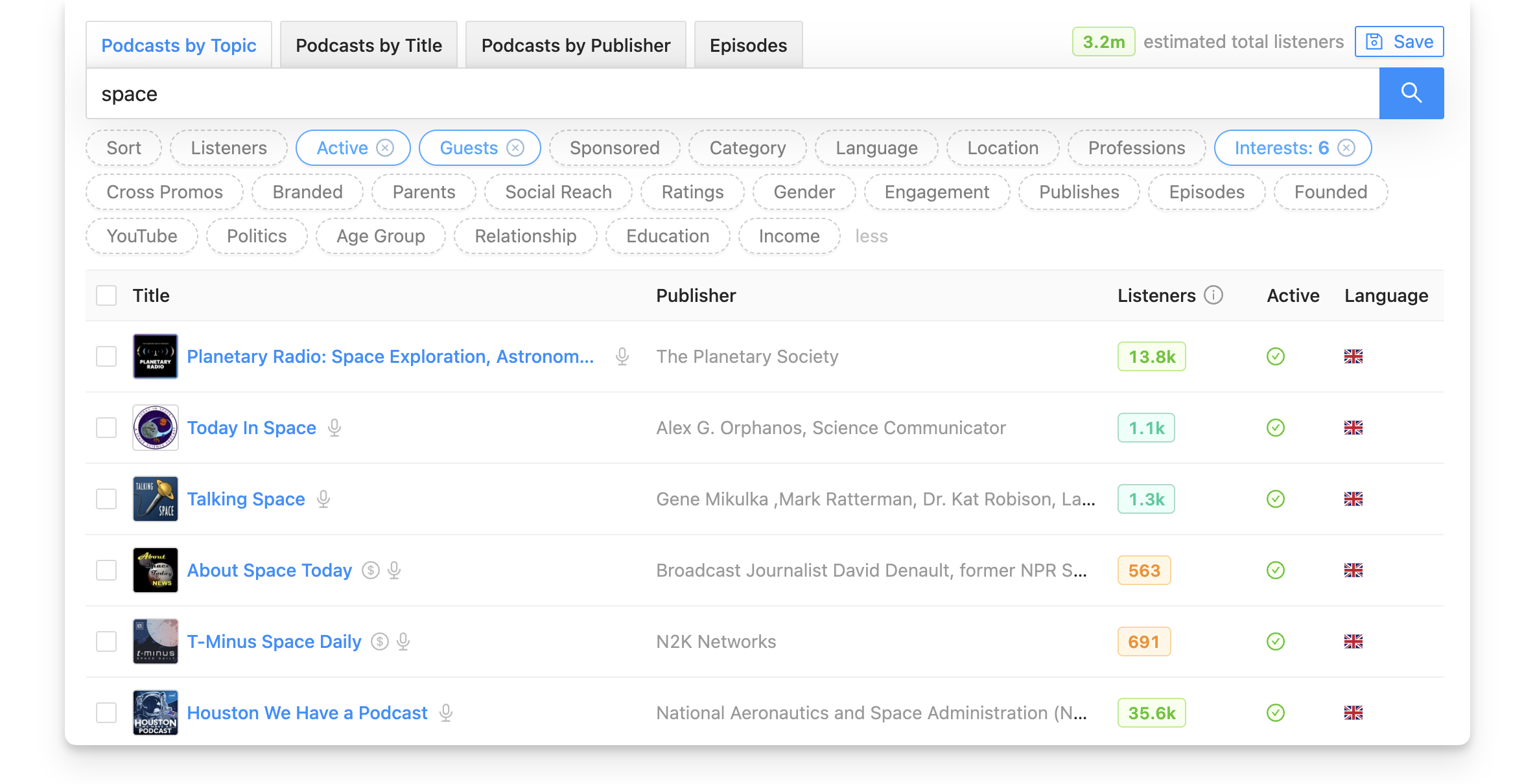
Rephonic has data on three million podcasts, meaning teams won't miss out on opportunities that smaller databases can't provide.
Obviously, only a fraction of these podcasts will suit each client, so you can apply up to 25 filters on your search to find highly relevant podcasts. Unlike many podcast search tools, Rephonic scans the titles, show notes and episode transcripts for your keyword, so the results are better.
Rephonic's most useful filters include:
- Active—use this to find podcasts that have recently posted episodes
- Guests—screen out podcasts that don't accept guests
- Listener numbers—filter for large, established podcasts or set it to find smaller shows with less than, say, 50 episodes.
Use Rephonic's audience demographic filters to search for podcasts who's audiences are highly likely to respond to your client's message. Filter for age range, location, language, interests, professions and more.
2. Qualify podcasts using data
As guest booking service Your Expert Guest found, using Rephonic to find and qualify podcasts can dramatically increase your clients' acceptance rates.
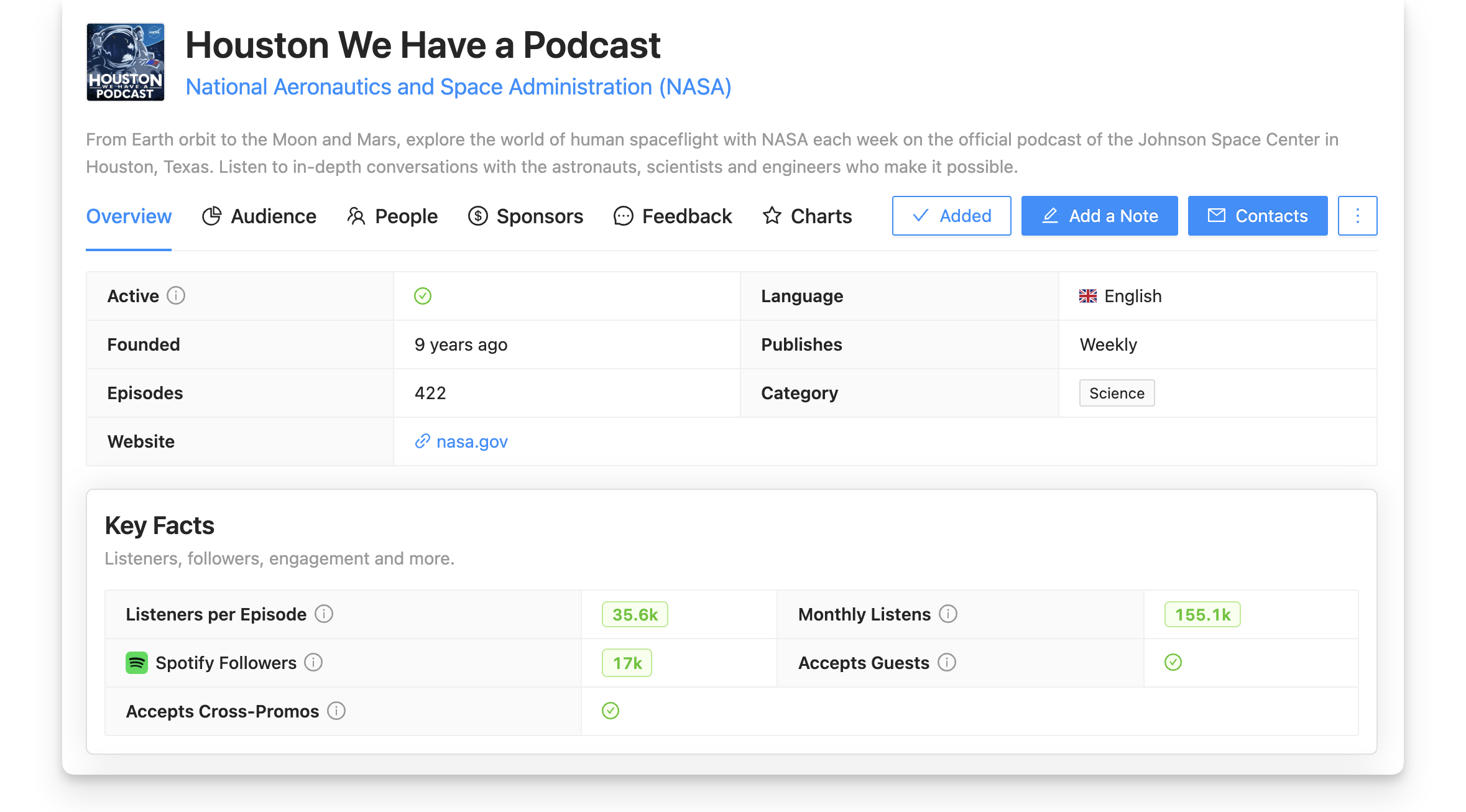
Tap on a podcast to see all the information Rephonic has gleaned from many datapoints across the web. Use the data to narrow down your initial list of possibilities until your campaign includes the most relevant podcasts.
Check across six tabs to find data such as:
- Listener numbers
- Spotify followers
- Social reach & links (including YouTube)
- Audience demographics
- Previous guests and their relevance to the show
- Past sponsors
- Reviews & ratings
- Chart rankings
- Listen to episodes
- Searchable transcripts
3. Build a campaign
Create a campaign on Rephonic and start adding podcasts. View your campaign as a list or a board.
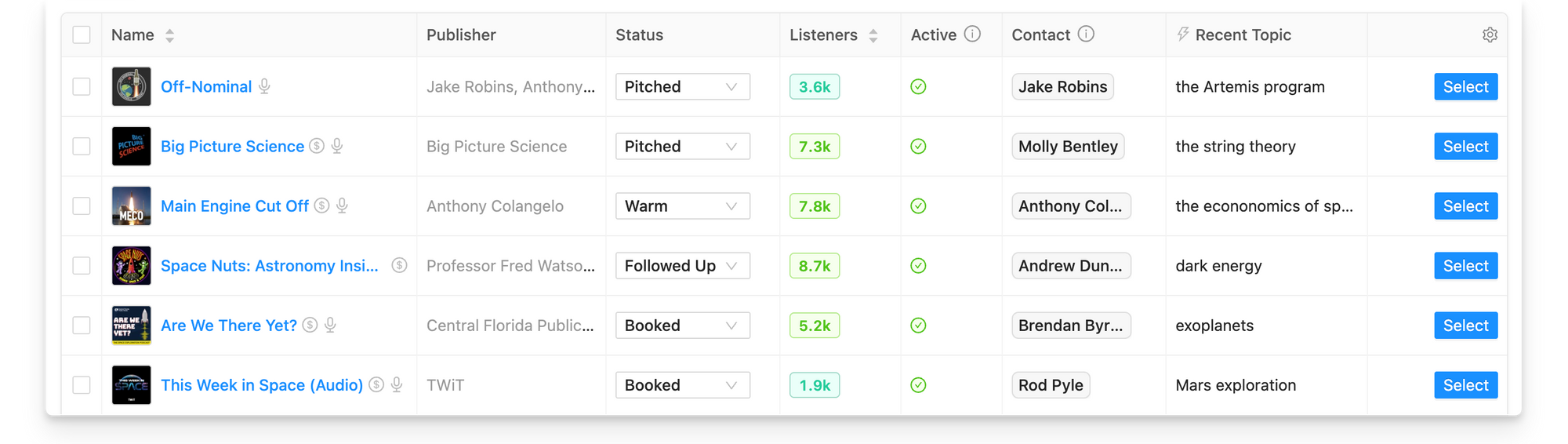
You can create multiple campaigns, for instance, one campaign per client or one per topic. Keep them on Rephonic or export as a CSV if you prefer.
Add notes to podcasts for the whole team to see. Everyone in your Rephonic team can view and edit campaigns, including bulk actions (select, copy, delete podcasts).
You'll also see campaign statistics including reply rate, positive reply rate, booking rate, and estimated total listeners— in fact, everything you need to keep tabs on every aspect of your podcast guesting campaigns.
4. Pitch and follow up
Rephonic provides contact info for every podcast—and includes a Concierge service if you need to find different contacts.
Use the Inboxes feature to connect and manage email accounts. Connect team members' emails and these are then shared across your team. That makes it much easier to collaborate without having to share passwords.
With connected email accounts you can send pitch emails directly through Rephonic. Outgoing emails and replies can then be seen in Rephonic, so everyone in the team can see what's been sent, what's scheduled and so on.
Here's how it works:
- Select contacts
- Choose a sequence (pitch + follow-up)
- Pick the inbox you want to send from
- Review drafts
- Configure your sending window
- Review drafts and send
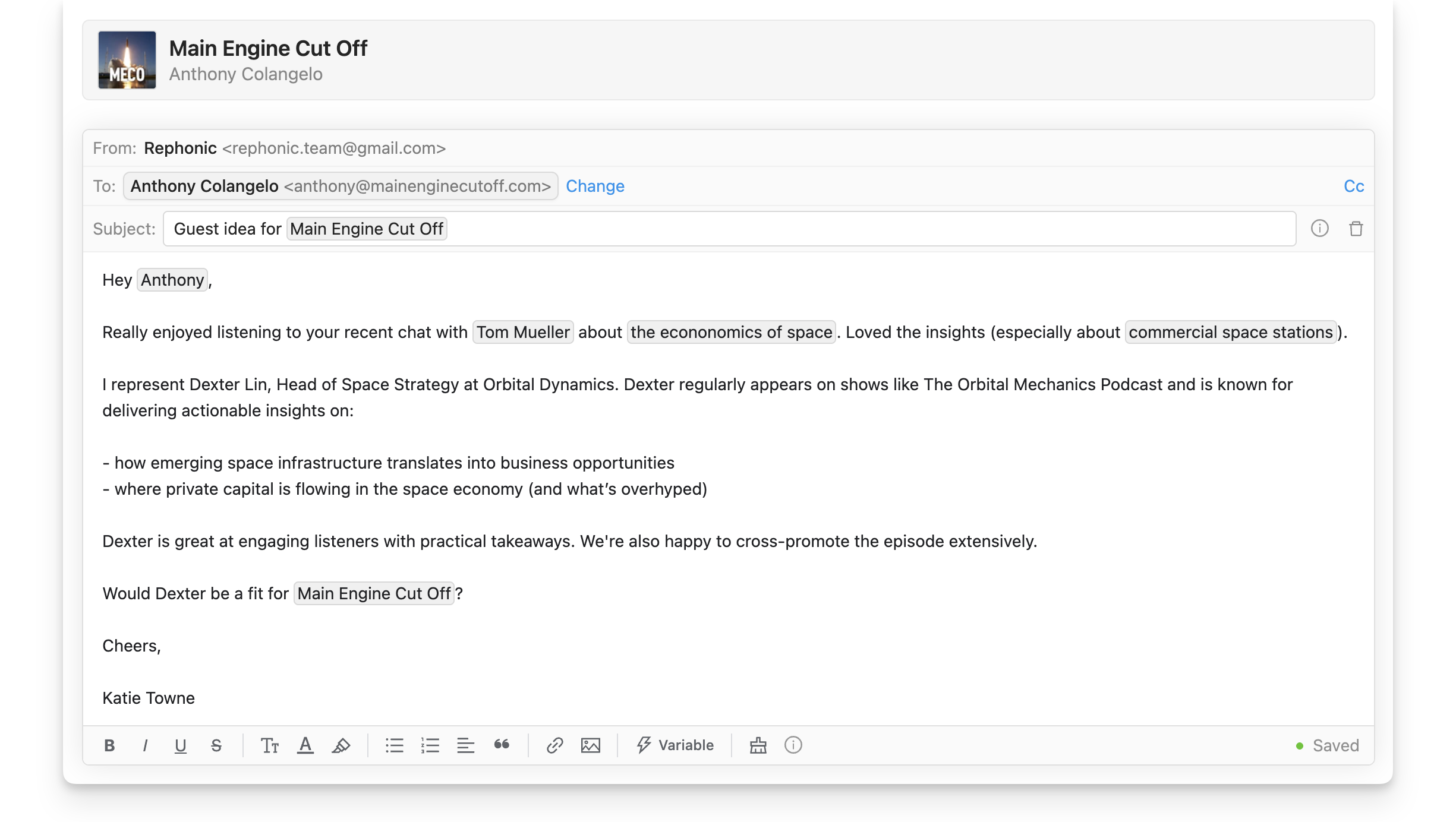
Whenever a show is pitched within Rephonic, it automatically moves to Pitched status within the campaign. If a prospective podcast agrees to an interview, it will move from Pitched to Warm to save you time.
5. Manage replies
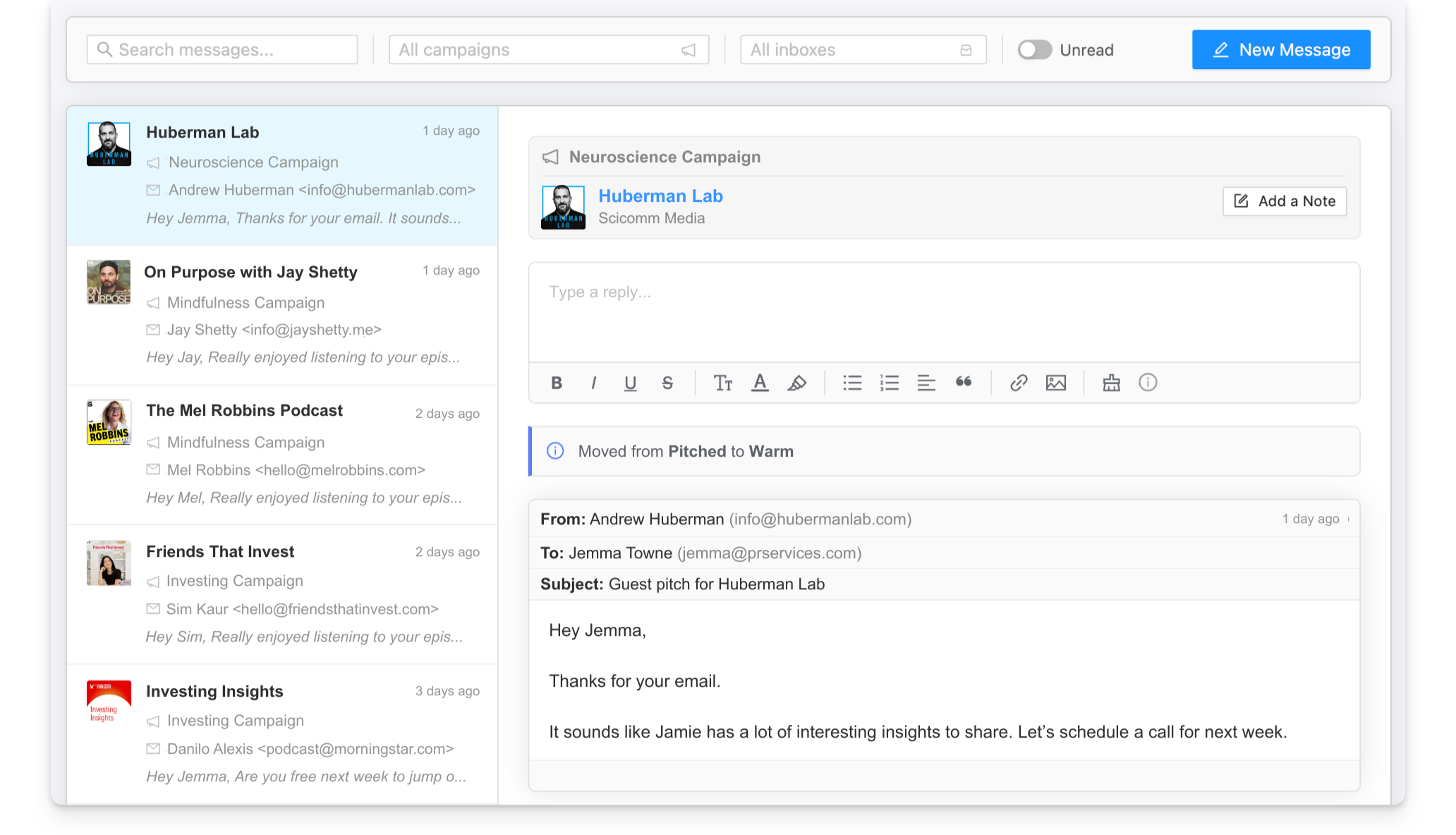
Rephonic provides a full email messaging interface so messages and replies no longer need to live in one person’s inbox, they're accessible to all team members.
Conversations move into a shared messaging workspace where your team can: search and filter threads, view queued and scheduled messages, and reply directly within campaign feeds.
- Use the "send manually" flow (i.e., open in email client, mark as sent) if preferred
- Filter threads for read/unread, email accounts and and campaigns, so it's easy to find specific conversations.
- View and manage or cancel queued and scheduled messages
- Reply directly within campaign feeds
Top three reasons to use Rephonic:
- Most comprehensive podcast database: Find the best matches for your clients, use targeted outreach and save time in the process.
- Covers the entire podcast outreach workflow: Find and qualify relevant shows, pitch and manage replies, track campaigns all within Rephonic.
- Team collaboration features: Connect multiple inboxes, work fully within the platform with notes and campaigns visible to all team members.
Final thoughts
PR teams need a guest booking platform to help them find the most relevant podcasts for their clients and manage outreach all in one place. And podcast hosts want considered, thoughtful pitches from genuine guests whose knowledge or opinions will benefit their listeners.
Rephonic helps PR and marketing teams save time and effort in finding those relevant podcasts, sending genuine pitches to hosts and keeping track of multiple campaigns.
That's why more and more teams are choosing Rephonic as their podcast guest booking service.
Discover the benefits for yourself. Sign up today with a 7-day free trial.
Article credits

Written by Lyn McNamee, podcast-PR writer with years of experience transforming podcast insights into practical, results-focused playbooks.

Edited by Becca Butcher, marketing specialist who frequently analyzes Rephonic’s data across 3 million podcasts.

How to See How Many Listeners a Podcast Has (& More Podcast Stats)
If you're planning to pitch yourself (or someone else) as a guest or sponsor, you probably want to know how many people are listening to it.

How to Maximize a $500 Podcast Guesting Budget
For entrepreneurs & marketing teams wanting to grow brand visibility, a podcast guesting budget of just $500 can set up a high-quality campaign.