PR teams use Rephonic’s podcast search tool because, unlike consumer platforms such as Spotify and Apple Podcasts, it is built specifically for outreach and makes it much easier to find the right podcasts to pitch.
Rephonic is the go-to tool for teams who want in-depth discovery and qualifying data and reliable contact info. And because teams can keep their outreach process on one platform, it’s easy for all members to collaborate.
This article looks at Rephonic’s podcast search engine in more depth. It explains why traditional podcast search engines don’t work for PR teams, and how Rephonic’s search engine helps them find relevant shows.
Table of Contents
What is a podcast search engine?
A podcast search engine is a tool that helps you find podcasts or episodes related to a topic, keyword, person, or show name.
Some are built for listeners who want to discover new shows or find a specific title or episode.
Others are built for PR teams and marketers and function more like podcast intelligence platforms, helping them identify the right shows to target for guesting, sponsorships, and advertising.
What are the traditional podcast search engines?
Apple Podcasts
Apple Podcasts is a massive podcast directory and listening app where listeners can browse, search, follow and play episodes.
Podcast creators submit their shows to Apple Podcasts, often using their podcast’s RSS feed. Apple then pulls in the show information such as the title, artwork, description and episodes, and displays that in the Apple Podcasts app and on the web.
It acts like a search engine by helping listeners find shows by title, episode and category. Apple Podcasts includes tools like podcast charts, curated playlists and “you might also like...” Each tool helps listeners find new shows or ones similar to podcasts they already enjoy.
Spotify
Spotify is quite different. It’s a streaming platform and describes itself as a place to access music, podcasts and video content. Spotify’s search function covers podcasts, songs, artists, playlists and more.
It acts as a podcast search engine because users can search for podcasts and browse featured and recommended shows. However, they can also save the ones they like and stream or download episodes in the Spotify app.
Like Apple Podcasts, Spotify also includes podcast charts, which help users discover popular shows.
Listen Notes
Unlike Apple Podcasts or Spotify, Listen Notes is a dedicated podcast search engine. Its own home page describes it as “like Google, but for podcasts.”
Listeners can search Listen Notes for podcasts by people, topics or podcast name. There's also a button directly below the search bar that lets you toggle between two search scopes: episodes or podcasts. You can order the search by relevance or date or select "only match titles" to get an exact match.
You can also discover podcasts and some information via several Listen Notes lists including:
- Trending - links to ten top podcasts
- Real Time - episode titles that people are listening to right now
- Explorer - enter a podcast title and receive a list of similar podcasts
- Best - select a region and subcategory to see a list of top podcasts
- Hot - based on user activities that day
- Curated - lists from online resources like articles and discussion groups
- Playlists - curated by the Listen Notes community.
PodSearch
The PodSearch home page describes this tool as "an interactive directory for podcast discovery."
Listeners can use the search engine to look for podcasts by title, publisher or keyword to bring up a results page with a list of podcast icons and links. You can also search by category or use lists such as "Top Podcasts." PodSearch also includes a newly launched list to help listeners find brand new shows.
Open a link to bring up the podcast's PodSearch page. This gives brief information about the podcast and its host, links to social media and a discover other podcasts section. It also includes the podcast's categories and an episode sample.
Challenges PR teams face with these platforms
The problem with each of these traditional podcast search engines is that they're built for people trying to find podcasts to listen to. They simply don't have the discovery and research tools that marketing and PR teams need to find and qualify the right podcasts for guest appearances and advertising.
Teams often start their podcast outreach efforts using these platforms. However, they quickly find themselves going around in circles, trying to get information that listener-focused search engines don't supply.
Teams end up spending hours going back and forth between traditional podcast search engines, Google and ChatGPT. Then they cobble it together in a way that Julie Fry of 'Your Expert Guest' describes as the highly inefficient "Frankenstein method" a process that "took hours of research."
Eventually, many PR and marketing teams realize they need a specialized tool that caters to the entire podcast outreach workflow.
That's when they reach for a tool like Rephonic.
The podcast outreach workflow
The podcast outreach workflow goes like this:
- Find relevant podcasts
- Qualify podcasts
- Pitch podcasts
- Manage the campaign
Now, we've simplified the workflow here, I know.
But search engines like Spotify, Listen Notes etc. can really only help with #1, i.e., podcast discovery. Even them, they're missing lots of functionalities that PR teams need.
Why PR teams need a specialised podcast search tool
PR teams need:
🔎 Better discovery and qualifying data
Clients deserve to be booked on the most relevant show possible. At the same time, they may ask why you've chosen that show, so teams need to provide the data that supports those decisions.
🔎 Efficiency
You're often working at scale, managing multiple clients and campaigns. Copy-pasting from several sources into spreadsheets may work for one client, but quickly becomes very inefficient when you try to scale it up.
🔎 Reliable contact information
Listeners don't need podcasters' contact information, so traditional podcast search engines don't supply it. PR teams need a reliable way to reach out to podcast hosts and producers without having to search the web or go through multiple social media accounts to find it.
🔎 Easy collaboration
PR teams need the easiest way possible to collaborate on their podcast outreach: shared spreadsheets can work but they're not the ideal solution.
Why PR teams use Rephonic
Rephonic focuses on audience analytics and demographic data, presenting information in charts and graphs useful for reporting.
That means PR and marketing teams can find and qualify relevant podcasts, pitch the hosts and producers and manage their outreach campaign from one platform.
Here's how teams use Rephonic to:
1. Find relevant podcasts
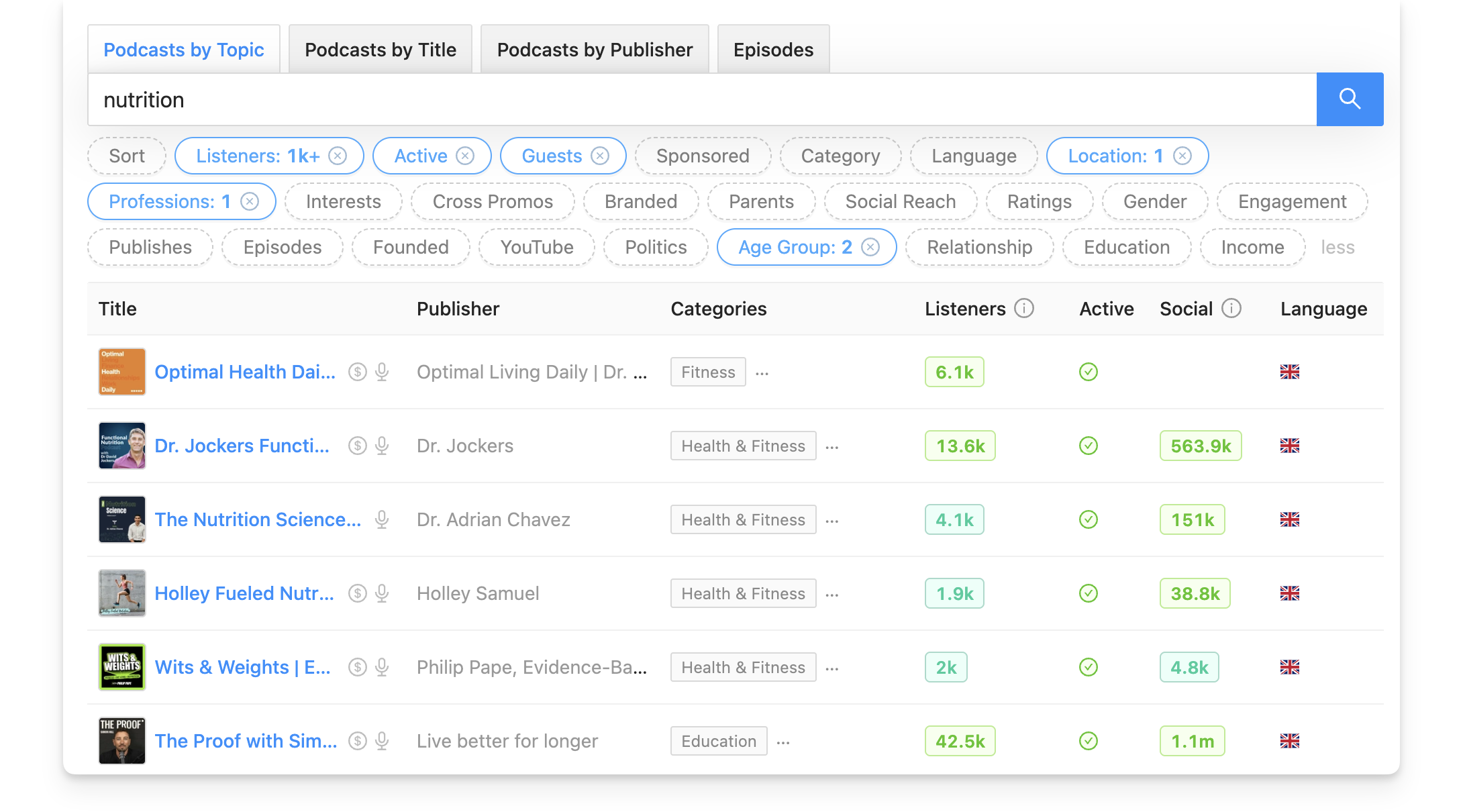
Search by topic, title, publisher, or episodes
Rephonic's search engine has four ways to find podcasts. These include entering a topic or keyword, using a specific podcast's title, searching for a publisher or using Episode Search.
Simply toggle the relevant tab above the search bar on your Home screen.

Apply advanced search filters
Use any number of Rephonic's 25 advanced search filters to narrow down the results list, depending on your search goal.
For example, apply the Active and Guests filters when searching for guesting opportunities. That way, your results won't include podcasts that have not uploaded an episode in the past 45 days, or shows that don't accept guests.
Or you might apply the listener numbers filter to specify larger or smaller podcasts. Or, you might decide to zero in on audiences with a specific age range, location or education level. Rephonic's filters allow all that and more.
Monitor podcasts for keywords
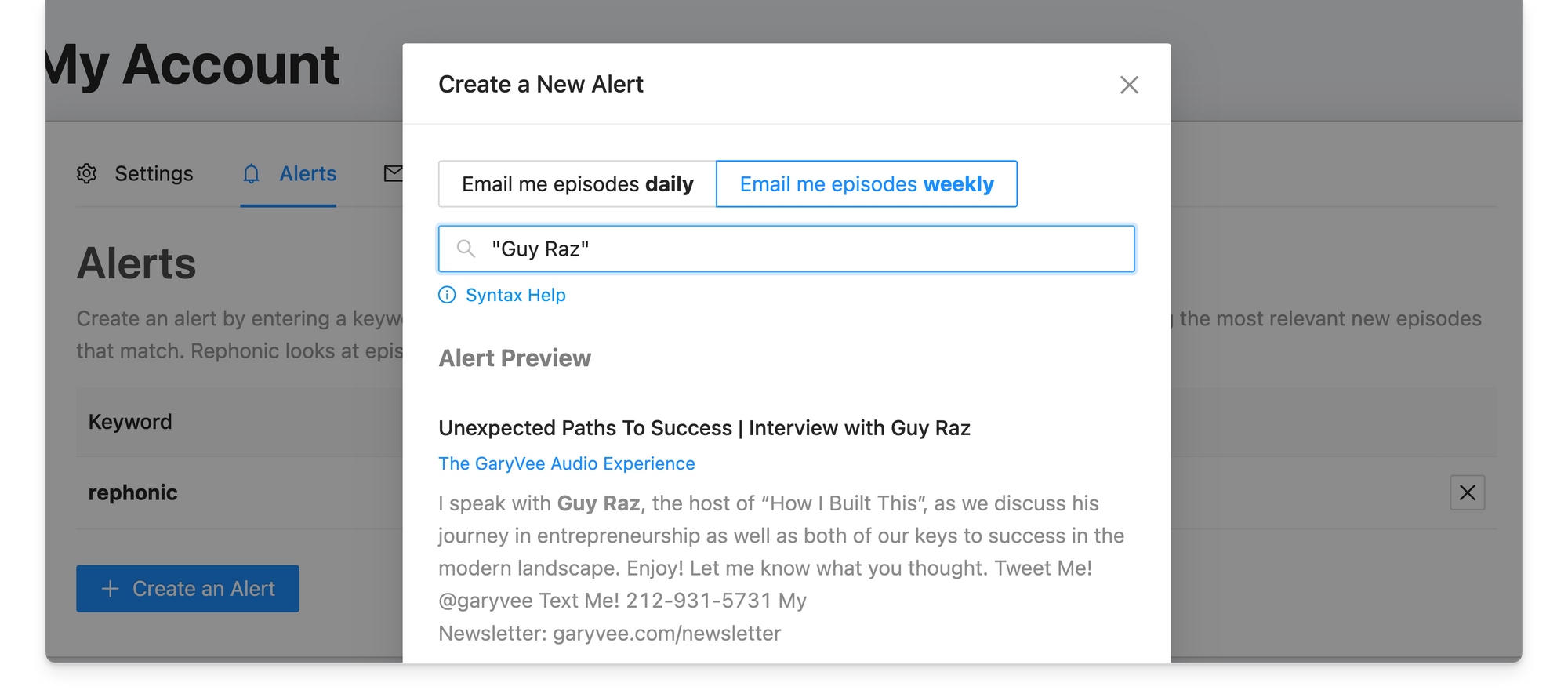
Create an alert by entering a keyword, phrase or name and Rephonic will check new episode titles, transcripts and show notes for it. We'll then send you a daily or weekly email containing any relevant new episodes that match your alert.
Easily find related podcasts
You may have a podcast in minds and want to find similar shows. Rephonic gives you two ways to do that.
- Scroll down the podcast Overview page to find the Related section which lists podcasts that listeners also subscribe to. You can select specific podcast titles or click to copy the entire list to your campaign.
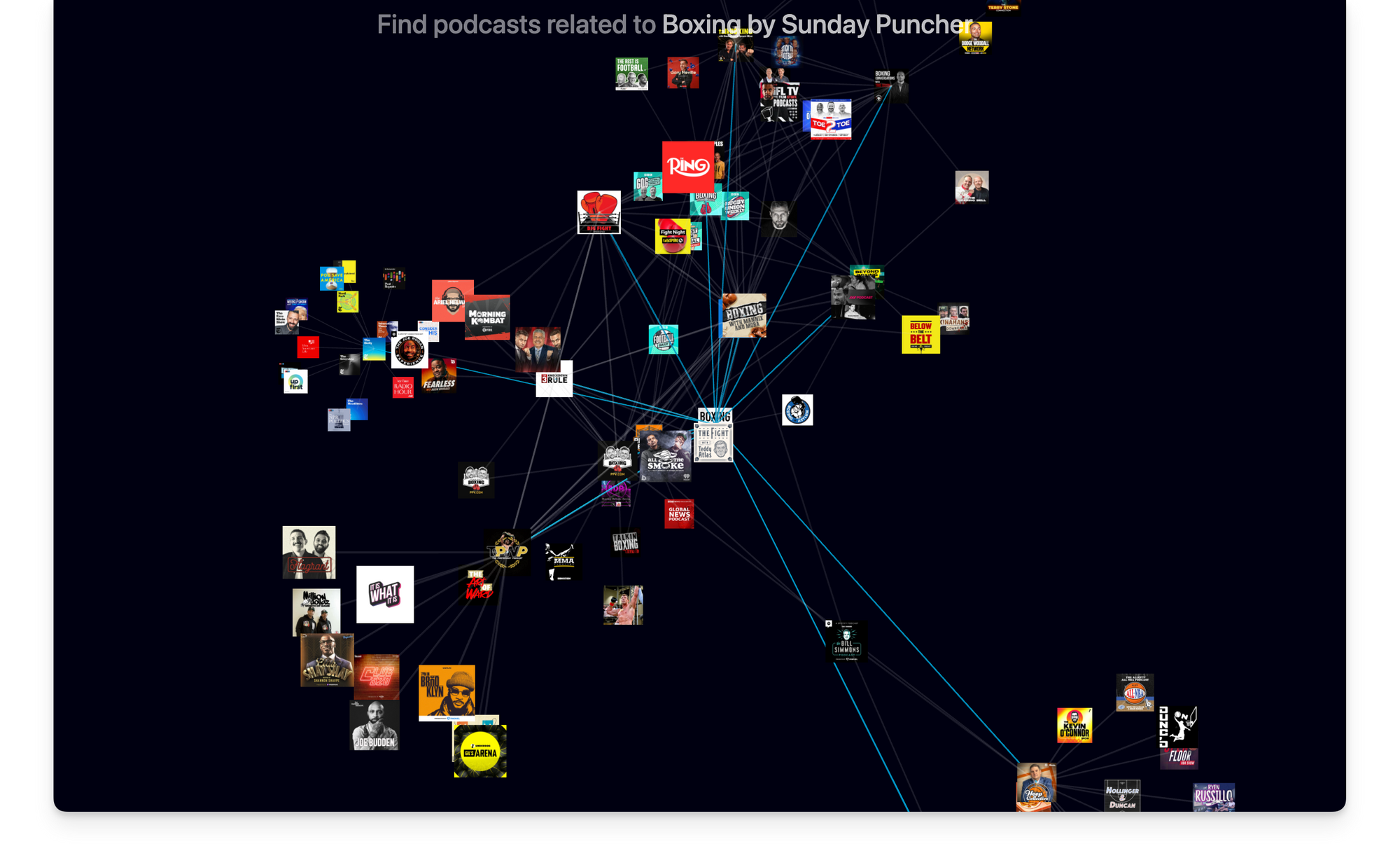
- Use Rephonic's 3D graph tool to see similar podcasts and understand how closely their subscribers overlap.
2. Qualify podcasts
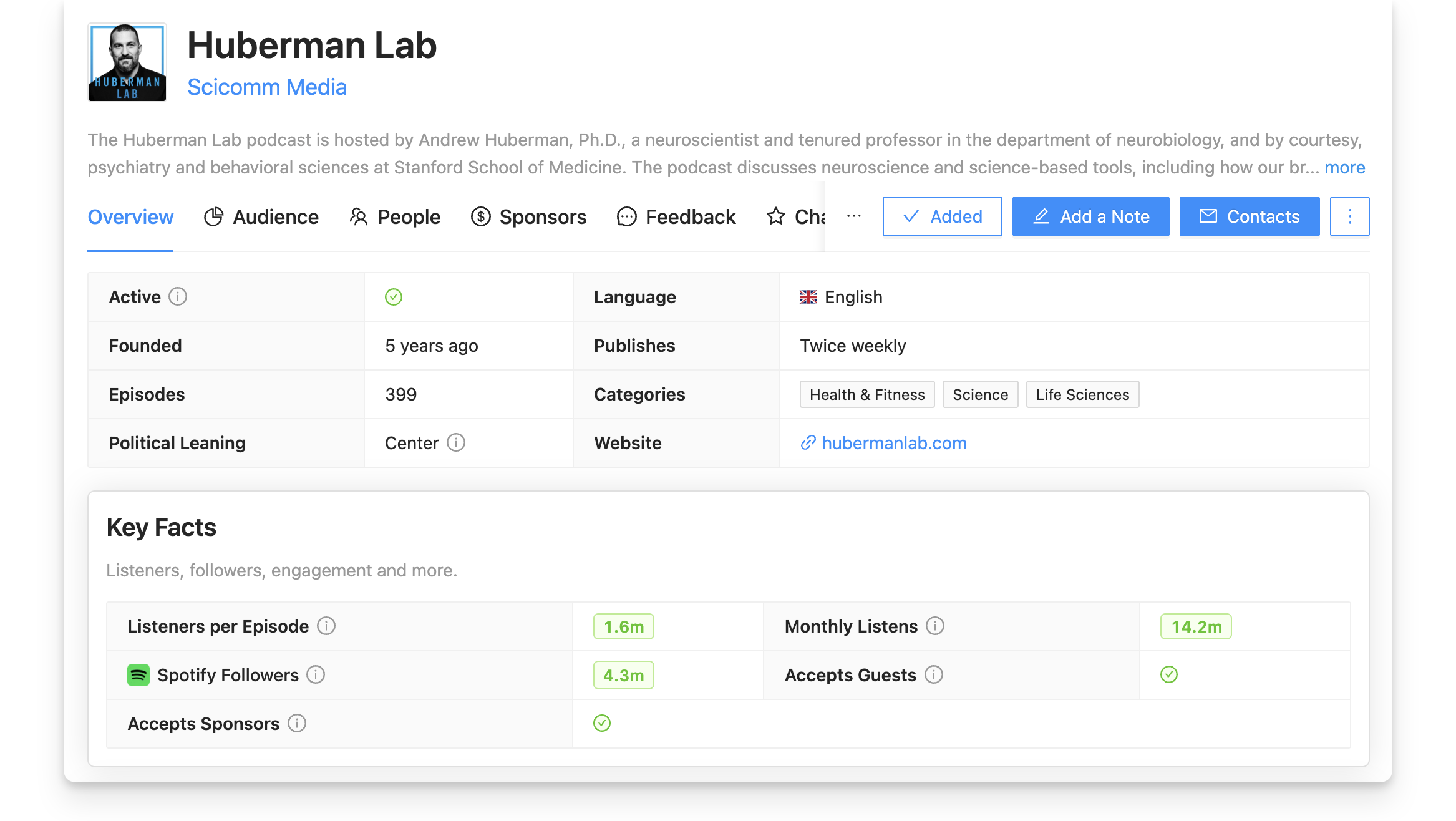
Rephonic gives PR and marketing teams many ways to narrow down their podcast lists to the most relevant shows that suit their client or campaign needs. Each podcast's data is split amongst six tabs on their podcast page. These are labeled Overview, Audience, People, Sponsors, Feedback and Charts.
Teams can qualify podcasts by their:
- Listener numbers: See these numbers in the Key Facts section in the Overview tab or use the Listeners filter during your search.
- Audience demographics: Select podcasts that closely match your client's target audience by checking the Audience tab of their podcast page. This tab starts with a typical listener profile, then goes into more depth, analysing the audience's likely age range, education level, interests, professions, income levels and more.
- Previous guests: Use the People tab to scroll through previous guests on the show. It also lets you search for specific names and jump straight to that guest. First you'll see an analysis of typical guests booked by that podcast. That's followed by guest's names, together with episode titles and link and a note on the interview's focus and relevance.
- Reviews and ratings: The Feedback tab gives you an overview of the ratings and reviews gained by the podcast and links to the actual reviews on Apple Podcasts, Podchaser, and other podcast apps, such as Castbox. The AI summary of the sentiments expressed in the reviews lets teams gauge listeners overall feelings and opinions.
- Chart rankings: You might also want to see where the podcast stands in the Apple, Spotify and YouTube charts. You'll see those standings under the podcast's Charts tab. Search these by overall standings or dig into categories or regions.
- Recent topics: It can be useful to see what topics hosts and guests have recently discussed, so Rephonic analyses podcast transcripts and lists recent topics in a section of the Overview tab.
- Social following: The Social section (Overview tab) shows the social media accounts and other places where a podcast appears around the web. Rephonic shows the Total Social Reach number followed by a breakdown of follower numbers on each platform and links to each account.
Once your team starts finding relevant shows, you can group them into a campaign so they stay organized in one place. Start by tapping the Build a campaign button at the top of a podcast page. This will prompt you to Build a new campaign. Tap the blue Add button beside any other podcast in the search to add it to the list. Alternatively, on your home page select Build a campaign from the Quick Steps section and follow the prompts.
3. Pitch podcast hosts and producers
Busy PR professionals need an easy way to pitch their clients to podcasts.
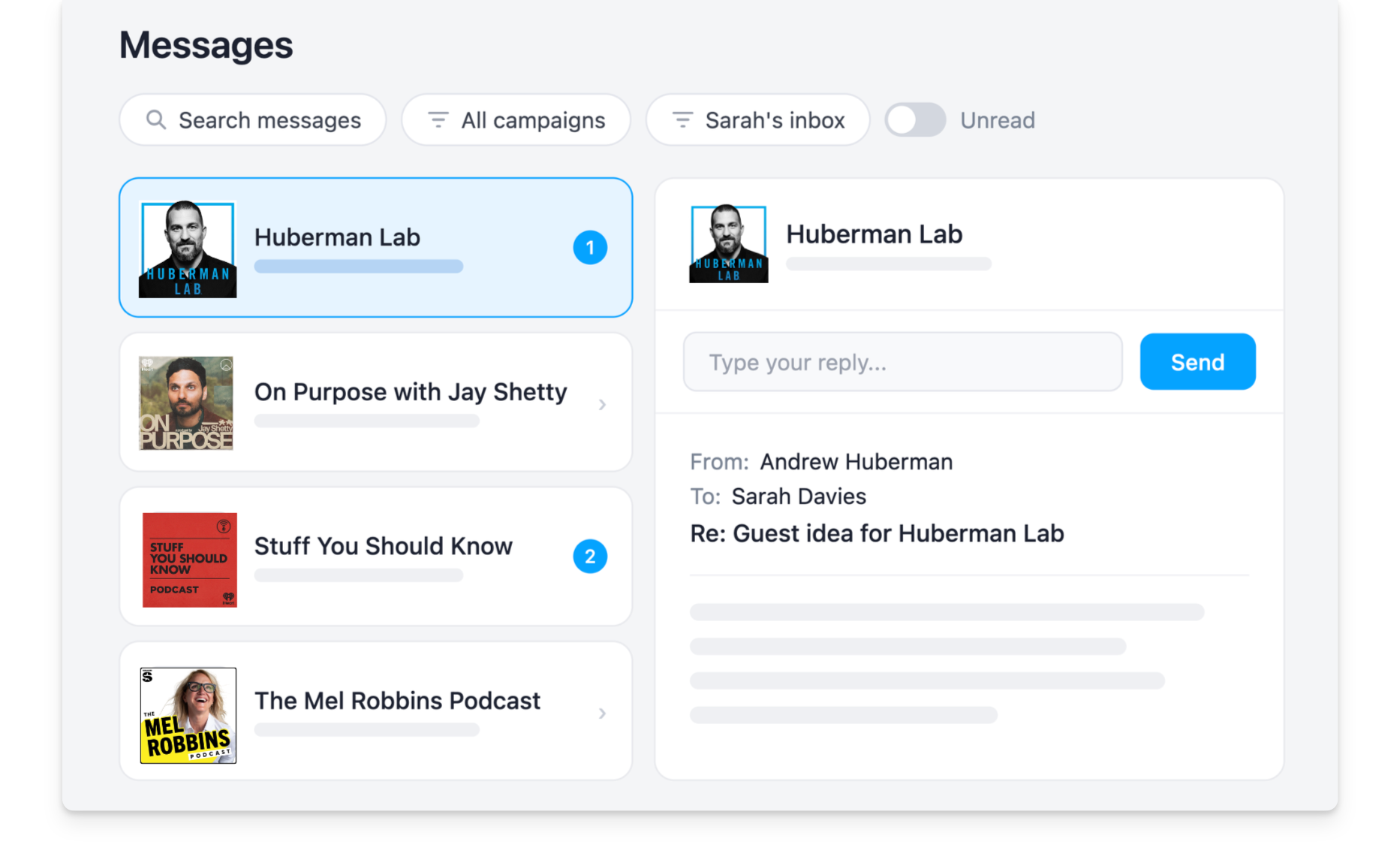
With Rephonic, team members can send pitches directly from the platform. It centralises the whole conversation so all members of your Rephonic team can see what the podcast host replied and reply without relying on one person’s inbox
This is especially useful if you’re running campaigns for multiple clients, and need to collaborate with other members of your team.
Here's how Rephonic enables effective podcast outreach.
- Contact info: Tap the blue contact button from any tab to find email addresses and social media links.
- Concierge service: Request help from our team to research other contact details or to report wrong information.
- Connect multiple inboxes: This allows you to send emails from your own email address, or your team member's, directly within Rephonic.
- Pitch podcasts within the platform: Use Rephonic's pitch templates or create your own format for the whole team to use on Rephonic's platform. This keeps everything in one place and lets everyone see the stage of each pitch in the pipeline.
- Create sequences to automatically send follow-ups: Select an existing sequence, create a new one with premade templates or customize it to suit your team's outreach strategy.
- Manage replies within the platform: Conversations move into a shared messaging workspace where your team can search and filter threads, view queued and scheduled messages, and reply directly within campaign feeds.
4. Manage campaigns
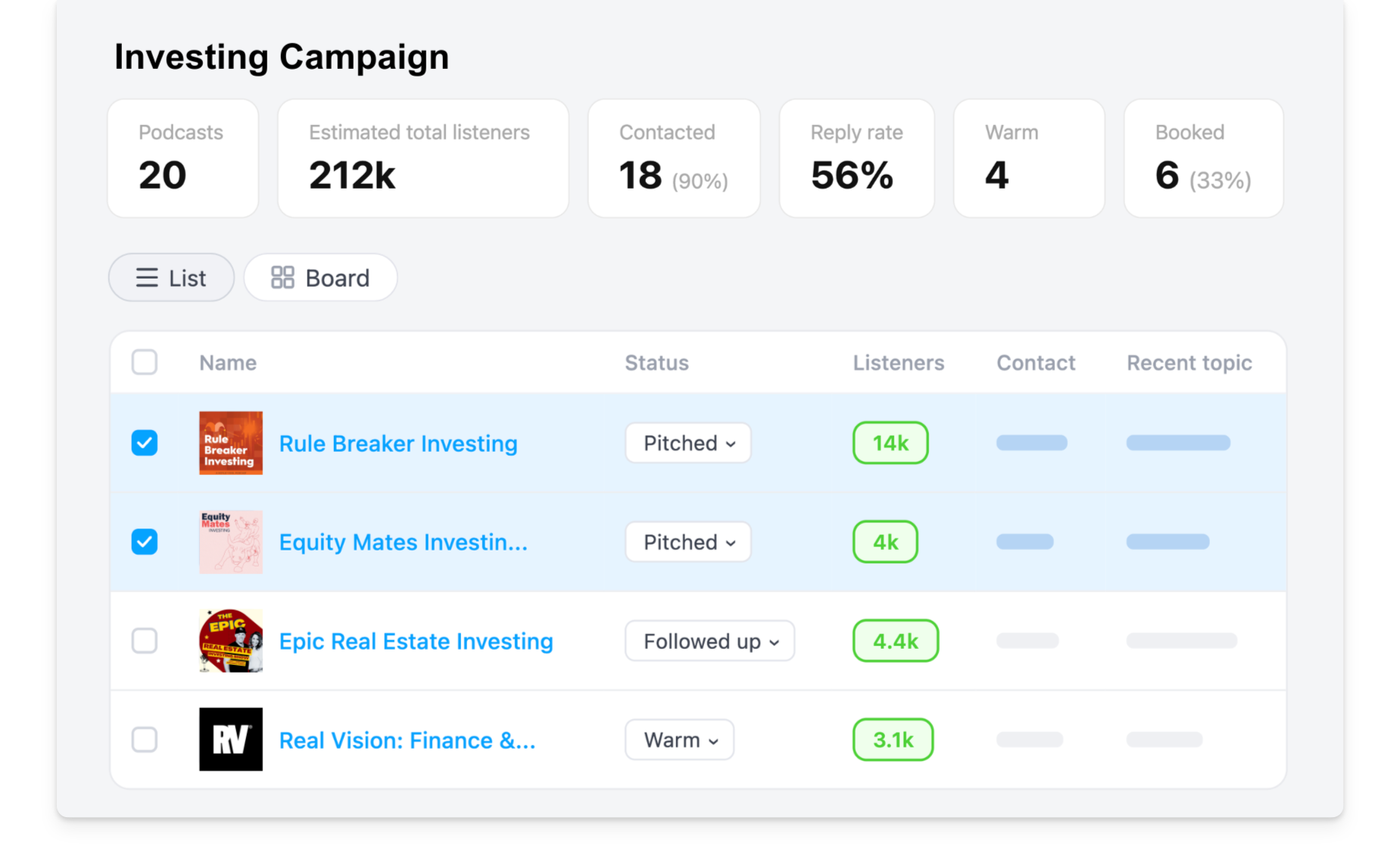
Create and manage multiple outreach campaigns within Rephonic. Add podcasts the campaign with just one click, then see each podcast's pitch status in the campaign pipeline.
- Update status: Assign each podcast a status of Prospect, Pitched, Followed-up, Warm, Lost and Booked. Update each podcast as it moves through the sequence so that everyone on the team can see what's happening in each campaign.
- View campaign statistics: View the campaign as a list or as a board. Use the Boards view to see the pipeline overview and to check the activity history. At the top of each campaign, your booking rate updates automatically as podcasts move into Booked, so you always have a quick read on performance.
Final thoughts
Consumer podcast apps like Spotify and Apple Podcasts are not designed for PR professionals seeking to find shows that take guests.
That's why Rephonic founder James Potter built a dedicated podcast database, comprehensive search tools and a place where all the search and outreach activity can stay in one place.
In 2020, I realised that those serious about podcast guesting needed solid data and contacts to book more podcast interviews and maximise the impact of their appearances. My mission is to help you grow your business through podcast guesting, by providing you with the tools you need.
James Potter
If you and your team want to run successful podcast guesting campaigns at scale, you need Rephonic.
Sign up for a free 7-day trial
Article credits

Written by Lyn McNamee, podcast-PR writer with years of experience transforming podcast insights into practical, results-focused playbooks.

Edited by Becca Butcher, marketing specialist who frequently analyzes Rephonic’s data across 3 million podcasts.

How to See How Many Listeners a Podcast Has (& More Podcast Stats)
If you're planning to pitch yourself (or someone else) as a guest or sponsor, you probably want to know how many people are listening to it.

How to Maximize a $500 Podcast Guesting Budget
For entrepreneurs & marketing teams wanting to grow brand visibility, a podcast guesting budget of just $500 can set up a high-quality campaign.